
What Small Businesses Need to Know About Web Based Time Clocks
If you’ve ever spent a Friday afternoon squinting at handwritten timesheets or cross-referencing a spreadsheet full of inconsistent entries, you already know the problem. Manual time tracking doesn’t just waste hours—it quietly drains money from your business through payroll errors, buddy punching, and disputed hours that no one can verify. For small businesses operating on tight margins, even a few miscalculated hours each pay period can add up to thousands in losses annually.
Web-based time clocks offer a straightforward fix. Unlike clunky hardware systems or error-prone paper methods, these cloud-powered tools let employees clock in from any browser or mobile device while giving owners real-time visibility into attendance and labor costs. They’re built with small teams in mind—affordable, simple to set up, and scalable as your workforce grows. In this article, we’ll explore why small businesses are making the switch, which features matter most, how to solve common scheduling and payroll headaches step by step, and what to look for when choosing the right system for your team.
Why Small Businesses Are Switching to Web-Based Time Clocks
The shift away from manual time tracking isn’t happening because of hype—it’s happening because small business owners are tired of bleeding money and time on systems that weren’t designed for how modern teams actually work. Paper timesheets rely on employee honesty and memory, both of which are unreliable. Spreadsheets require someone to manually input, verify, and reconcile data every pay period. Traditional punch clocks solve the honesty problem but create new ones: they’re expensive to install, limited to a single location, and offer zero flexibility for remote or mobile workers.
Web-based time clocks eliminate these friction points in ways that matter specifically to smaller operations. There’s no hardware to purchase or maintain—employees access the system through a browser or phone they already own. The cost structure typically runs a few dollars per employee per month rather than thousands upfront for physical equipment. More importantly, the accuracy gains are immediate. When clock-in times are captured digitally with timestamps that can’t be altered after the fact, payroll disputes drop dramatically. Overtime calculations happen automatically instead of requiring manual review.
For owners juggling multiple roles, the time savings alone justify the switch. Instead of spending two or three hours each week reconciling attendance records, the data flows directly into payroll-ready reports. That’s time redirected toward revenue-generating work—serving customers, managing projects, or simply going home on time. The accessibility factor also matters for businesses with field workers, multiple locations, or hybrid arrangements. Everyone clocks in through the same system regardless of where they’re working, creating a single source of truth for attendance data that scales naturally as you add team members.
Core Features of Modern Attendance Management Systems
Not every web-based time clock is built the same, and the features that matter most depend on how your team operates. That said, there’s a core set of functionalities that separate genuinely useful systems from glorified digital punch cards. Understanding what each feature actually does—and which specific problem it solves—helps you avoid paying for tools you’ll never use while ensuring you don’t miss capabilities that could save you hours every week.
Accurate Time Tracking and Clock-In/Out Methods
The foundation of any time clock system is how employees actually record their hours. Modern platforms offer multiple clock-in methods to accommodate different work environments. Browser-based access works well for office staff who are already at a computer. Mobile apps serve field workers, delivery drivers, or anyone who doesn’t sit at a desk. Kiosk mode turns a shared tablet into a centralized station for warehouses or retail locations where personal devices aren’t practical during shifts.
What makes these methods superior to manual alternatives is the verification layer built into each one. Geolocation tagging confirms that a remote employee is actually at the job site when they clock in—not sitting at home. IP address restrictions can limit clock-ins to your office network, preventing off-site punches entirely. Some systems add photo capture at clock-in to eliminate buddy punching without requiring expensive biometric hardware. Every entry carries an uneditable timestamp, which means payroll calculations start from verified data rather than approximations. When your timesheet accuracy improves, overpayment from rounded or fabricated hours disappears almost immediately.
Flexible Shift Scheduling for Dynamic Teams
Small businesses rarely run on predictable 9-to-5 schedules. Restaurants rotate staff across lunch and dinner shifts. Retail stores ramp up coverage on weekends. Cleaning companies assign crews to different client sites daily. A scheduling tool built into your time clock eliminates the back-and-forth texts, sticky notes, and group chat confusion that typically accompanies shift coordination.
The practical value shows up in how schedules get created and communicated. Template schedules let you build a standard week once, then replicate it with minor adjustments instead of starting from scratch every cycle. Drag-and-drop interfaces make reassigning shifts intuitive when someone calls out sick. Employees receive automatic notifications when their schedule changes or a new shift becomes available, reducing “I didn’t know I was working” situations. Shift swap requests flow through an approval workflow so managers maintain control without needing to broker every trade manually. For part-time and variable-hour staff especially, this visibility reduces no-shows and gives workers the autonomy to manage their availability within boundaries you set.
Reporting and Insights for Informed Decisions
Raw attendance data becomes genuinely useful only when it’s organized into reports you can act on. The reporting capabilities in a web-based time clock transform scattered clock-in records into clear answers about where your labor dollars are going. Hours-worked summaries broken down by employee, department, or location reveal staffing imbalances you might not notice day-to-day. Overtime reports flag when employees are approaching threshold hours before you get hit with unexpected premium pay on Friday’s payroll run.
Project-based tracking takes this further for service businesses. When employees log time against specific jobs or clients, you can calculate actual labor costs per project and compare them against your estimates. This turns time tracking from a payroll obligation into a profitability tool—you’ll see which jobs consistently run over budget and which clients generate healthy margins. Labor cost analysis over time also helps with forecasting. Instead of guessing how many hours you’ll need next month based on gut feeling, you’re working from historical patterns that account for seasonal fluctuations, growth trends, and scheduling efficiency. Data replaces guesswork, and decisions get sharper as a result.
Solving Common Small Business Pain Points: A Step-by-Step Guide
Knowing that web-based time clocks exist is one thing—actually using them to fix the specific problems keeping you up at night is another. Most small business owners aren’t looking for technology for its own sake. They want fewer payroll headaches, less time spent on scheduling logistics, and confidence that their labor costs aren’t silently spiraling. The following steps address each of these concerns with concrete actions you can take this week.
Step 1: Finding Affordable Attendance Tracking Options
Cost is the first filter for most small businesses, and rightfully so. The good news is that web-based time clocks operate on subscription models that typically charge a small base fee plus a per-employee monthly rate—meaning you’re paying proportionally to your team size rather than absorbing a massive upfront investment. When evaluating affordability, look beyond the sticker price. Transparent pricing without hidden fees for features like reporting or mobile access matters more than finding the absolute cheapest option. Check whether the provider requires annual contracts or allows month-to-month billing, which gives you flexibility to switch if the tool doesn’t fit. Free trials lasting 14 to 30 days let you test the system with real employees before committing any budget.
Here’s the perspective that reframes the cost conversation entirely: calculate what manual errors currently cost you. If buddy punching, rounded hours, or overtime miscalculations add even 15 minutes of overpayment per employee per day, a team of ten costs you roughly 12.5 extra hours per week. That phantom labor expense almost certainly exceeds what a time clock subscription would run. The system pays for itself by eliminating the invisible losses you’ve been absorbing without realizing their scale.
Step 2: Implementing Easy Scheduling for Part-Time Staff
Part-time and variable-hour employees create the most scheduling complexity because their availability shifts constantly. Start by building template schedules that reflect your most common weekly patterns—your standard Tuesday lunch crew, your weekend retail coverage, your recurring cleaning routes. Templates become your baseline, requiring only minor tweaks each cycle rather than full rebuilds. Next, use bulk assignment to populate shifts across multiple employees simultaneously instead of entering each one individually. This alone can cut scheduling time from an hour to ten minutes for a team of fifteen.
The employee-facing side matters just as much. Enable mobile notifications so staff receive instant alerts when schedules are published or shifts change. Activate the self-service portal where employees can update their availability, request time off, and pick up open shifts without texting you directly. Shift swap requests should route through a simple approval step—you maintain oversight without becoming the bottleneck. The result is fewer no-shows, less last-minute scrambling, and a team that feels more in control of their own work-life balance, which reduces turnover in roles where finding replacements is expensive and disruptive.
Step 3: Streamlining Payroll Integration
The final piece connects your time data directly to payroll processing, eliminating the manual export-and-reentry step where most errors creep in. Look for systems that integrate natively with the payroll software you already use—whether that’s QuickBooks, Gusto, ADP, or another platform common among small businesses. Native integration means approved timesheets flow automatically into your payroll system with hours, overtime, and pay rates already calculated correctly.
If direct integration isn’t available for your specific payroll provider, ensure the time clock exports clean CSV or formatted reports that match your payroll import requirements. The goal is zero manual data entry between time tracking and paycheck generation. Before your first integrated payroll run, reconcile one pay period manually against the system’s output to verify accuracy. Once you confirm the numbers match, you can trust the automated flow going forward. This single workflow change typically saves one to three hours per pay period and virtually eliminates transposition errors—the kind where a “4” becomes a “9” and someone gets paid for hours they never worked.
When to Consider Premium Tools for Advanced Needs
A basic web-based time clock handles attendance and simple scheduling well enough for most small businesses in their early stages. But as your operation grows—or if your industry carries specific compliance demands—there’s a point where standard features no longer cover what you need. Recognizing that threshold saves you from outgrowing your system at the worst possible moment.
Advanced job costing becomes worthwhile when you’re running multiple projects simultaneously and need to understand profitability at a granular level. If you’re a contractor bidding on jobs or an agency managing client accounts, knowing exactly how many labor hours each project consumes determines whether you’re making money or subsidizing unprofitable work. PTO accrual management matters once your team is large enough that tracking vacation balances manually becomes a liability—miscalculating someone’s earned time off creates legal exposure and employee frustration. Custom compliance reporting earns its cost when you operate across multiple jurisdictions with different overtime rules, break requirements, or labor posting obligations. Rather than manually auditing records before each compliance deadline, the system flags violations in real time and generates audit-ready documentation automatically. These premium capabilities aren’t necessary on day one, but they become essential infrastructure once your headcount crosses roughly fifteen to twenty employees or your regulatory environment demands airtight recordkeeping. Plan your upgrade path early so the transition feels like a natural step rather than an emergency migration.
Getting Started: Implementing Your First Web-Based Time Clock
Moving from manual tracking to a web-based system doesn’t require a massive IT project or weeks of disruption. With the right approach, most small businesses can be fully operational within a few days.
Choosing the Right Provider
Start by signing up for free trials with two or three providers that fit your budget and team size. During the trial, test the actual clock-in experience from an employee’s perspective—if it takes more than ten seconds, adoption will suffer. Check that customer support is responsive through live chat or phone rather than ticket-only systems where you wait 48 hours for answers. Read reviews specifically from businesses with similar headcounts and industries to yours, since a platform that works beautifully for a 200-person company may be overcomplicated for a team of eight.
Rollout and Team Training Tips
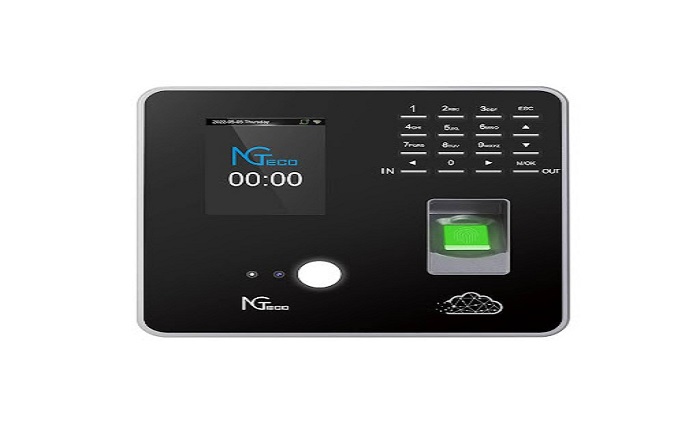
Before launching company-wide, communicate clearly why you’re making the change—frame it around fairness and simplicity rather than surveillance. Run a one-week pilot with three or four employees who are comfortable with technology and can provide honest feedback about friction points. Use their input to configure settings and write a one-page quick-start guide covering clock-in, break tracking, and schedule viewing. Then roll out to the full team with a brief fifteen-minute walkthrough, keeping the printed guide available for reference. Most employees adapt within two to three days when the tool is intuitive and the reasoning behind the switch is transparent. Some businesses that prefer a hybrid approach pair their web-based software with dedicated hardware terminals from manufacturers like NGteco, which offer biometric and facial recognition devices that integrate with cloud platforms for locations where a shared physical clock-in point is more practical than individual devices.
Upgrade Your Time Tracking to Drive Small Business Growth
Web-based time clocks represent one of the highest-impact, lowest-effort upgrades a small business can make to its daily operations. By replacing manual timesheets and outdated punch systems with cloud-based tracking, you gain immediate improvements in payroll accuracy, scheduling efficiency, and labor cost visibility—without the burden of expensive hardware or complex IT infrastructure. The core value proposition is simple: verified attendance data flows seamlessly from clock-in to paycheck, eliminating the errors, disputes, and wasted administrative hours that quietly erode your bottom line.
Whether you’re managing a five-person crew or scaling toward twenty employees across multiple locations, these systems grow with you. Start with the fundamentals—accurate time tracking, mobile accessibility, and payroll integration—then expand into advanced scheduling, reporting, and compliance tools as your needs evolve. The businesses that thrive aren’t necessarily the ones working the hardest; they’re the ones that stop spending energy on problems that technology solved years ago. Take the free trial, run a pilot with your team, and redirect those recovered hours toward the work that actually moves your business forward.